onoae

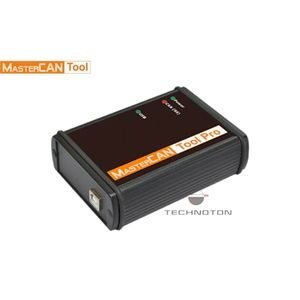
Technoton MasterCAN Bus Analyser Simulator

Technoton MasterCAN Bus Analyser Simulator

Product Note:

No product notes available.

Description

Technoton MasterCAN Bus Analyser Simulator

Technoton MasterCAN Bus Analyser Simulator is a powerful software-and-hardware CAN SAE J1939 analytical tool for engineers, programmers, and other professionals in the area of design and servicing vehicle electronic units, telematics systems, and onboard equipment – fuel sensors, trackers, gateways.

MasterCAN Tool is designed for CAN SAE j1939 data monitoring, and analysis as well as PGN message emulation and modeling. MasterCAN Tools is also used for CAN j1939/S6 Telematics interface diagnostics and configuration.

Functions

  • CAN Bus Analyzer Mode: Monitors raw CAN bus messages in real-time, decoding SAE J1939/71 parameters such as fuel level, engine RPM, coolants, axle loads, and total fuel consumption.

  • CAN Bus Simulator Mode: Generates and injects synthetic CAN J1939/ISOBUS messages into a telematics gateway or GPS tracking terminal, allowing engineers to test hardware without a physical vehicle.

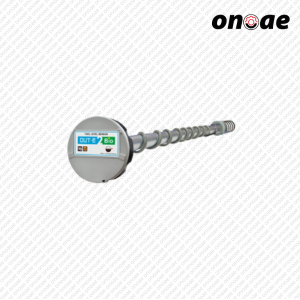
  • Technoton S6 Sensor Configuration: Serves as a service setup tool to program, calibrate, and update firmware on Technoton S6 devices (DUT-E fuel level sensors, DFM fuel flow meters, and GNOM axle load sensors).
Specifications

FeatureSpecification
Supported ProtocolsCAN SAE J1939, ISOBUS (ISO 11783), Technoton S6
Baud Rates250 kbps, 500 kbps (Auto-detect & configurable)
PC ConnectionUSB 2.0 interface
Operating ModesMonitor / Analyzer, Generator / Simulator, Service Tool
Power SupplyPowered via USB port or external 10–30 V DC
Software SuiteService S6 MasterCAN / MasterCAN Tool PC software

Features

  • Automated Parameter Parsing: Scans and converts raw SAE J1939 PGNs into readable Suspect Parameter Numbers (SPNs).

  • Real-Time Bus Load Monitoring: Displays real-time bandwidth usage (%) to prevent bus congestion.

  • DTC & ECU Diagnostic Reading: Reads Diagnostic Trouble Codes (DTCs) and active ECU fault codes directly from vehicle buses.

  • Log File Recording: Captures raw CAN logs to .txt or CSV files for post-analysis or troubleshooting

Applications

  • Bench Testing Telematics Gateways: Simulating vehicle parameters (e.g., speed, fuel consumption) to verify tracking units before field deployment.

  • CAN Bus Reverse Engineering: Identifying non-standard PGNs/SPNs on trucks, agricultural machinery, and heavy equipment.

  • Technoton Fleet Calibration: Diagnostics and parameter setup for DUT-E fuel sensors and DFM flow meters over the S6 bus.

Related Products

Technoton MasterCAN Bus Analyser Simulator

Technoton MasterCAN Bus Analyser Simulator is a powerful software-and-hardware CAN SAE J1939 analytical tool for engineers, programmers, and other professionals in the area of design and servicing vehicle electronic units,

Product Note:

No product notes available.

Loading...

Description

Technoton MasterCAN Bus Analyser Simulator

Technoton MasterCAN Bus Analyser Simulator is a powerful software-and-hardware CAN SAE J1939 analytical tool for engineers, programmers, and other professionals in the area of design and servicing vehicle electronic units, telematics systems, and onboard equipment – fuel sensors, trackers, gateways.

MasterCAN Tool is designed for CAN SAE j1939 data monitoring, and analysis as well as PGN message emulation and modeling. MasterCAN Tools is also used for CAN j1939/S6 Telematics interface diagnostics and configuration.

Functions

  • CAN Bus Analyzer Mode: Monitors raw CAN bus messages in real-time, decoding SAE J1939/71 parameters such as fuel level, engine RPM, coolants, axle loads, and total fuel consumption.

  • CAN Bus Simulator Mode: Generates and injects synthetic CAN J1939/ISOBUS messages into a telematics gateway or GPS tracking terminal, allowing engineers to test hardware without a physical vehicle.

  • Technoton S6 Sensor Configuration: Serves as a service setup tool to program, calibrate, and update firmware on Technoton S6 devices (DUT-E fuel level sensors, DFM fuel flow meters, and GNOM axle load sensors).
Specifications

FeatureSpecification
Supported ProtocolsCAN SAE J1939, ISOBUS (ISO 11783), Technoton S6
Baud Rates250 kbps, 500 kbps (Auto-detect & configurable)
PC ConnectionUSB 2.0 interface
Operating ModesMonitor / Analyzer, Generator / Simulator, Service Tool
Power SupplyPowered via USB port or external 10–30 V DC
Software SuiteService S6 MasterCAN / MasterCAN Tool PC software

Features

  • Automated Parameter Parsing: Scans and converts raw SAE J1939 PGNs into readable Suspect Parameter Numbers (SPNs).
  • Real-Time Bus Load Monitoring: Displays real-time bandwidth usage (%) to prevent bus congestion.
  • DTC & ECU Diagnostic Reading: Reads Diagnostic Trouble Codes (DTCs) and active ECU fault codes directly from vehicle buses.

  • Log File Recording: Captures raw CAN logs to .txt or CSV files for post-analysis or troubleshooting

Applications

  • Bench Testing Telematics Gateways: Simulating vehicle parameters (e.g., speed, fuel consumption) to verify tracking units before field deployment.

  • CAN Bus Reverse Engineering: Identifying non-standard PGNs/SPNs on trucks, agricultural machinery, and heavy equipment.

  • Technoton Fleet Calibration: Diagnostics and parameter setup for DUT-E fuel sensors and DFM flow meters over the S6 bus.